
Service Quotas Increase Widget
A tool designed to help IT teams manage their AWS Service Quotas — view limits and request increases for any service directly from a simple interface.
About This Widget
AWS Service Quotas are limits set by AWS on the number of resources you can use per account. Managing these limits can be time-consuming when done through the AWS console directly.
This widget surfaces quota data for any AWS service — EC2, S3, WorkSpaces, and more — and lets you submit increase requests without ever leaving the WIC dashboard.
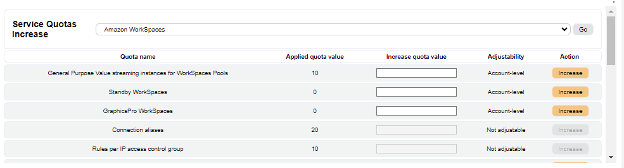
Workflow
How It Works
Select a Service
Choose any AWS service from a dropdown menu. The widget supports the full range of services including Amazon EC2, Amazon S3, and Amazon WorkSpaces, each with its own distinct set of quotas.
View Current Quotas
The widget retrieves and displays all quotas for the selected service. Each row shows:
- Quota Name: The resource limit identifier
- Applied Quota Value: Your current enforced limit
- Increase Quota Value: Input field to request a higher limit
- Adjustability: Whether AWS allows increases for this quota
Request a Quota Increase
For any adjustable quota, enter the new desired value in the input field and click Increase. The widget submits the request to AWS and returns real-time feedback on whether the operation succeeded.
Ready to Take Control?
See the full Workspace Insights Commander suite and get started today.