User Connection
Details Widget
A powerful tool for managing and troubleshooting AWS WorkSpaces. By leveraging AWS Lambda, CloudWatch Logs, and the Boto3 library, the widget provides a detailed, user-friendly view of critical virtual desktop information.
What It Does
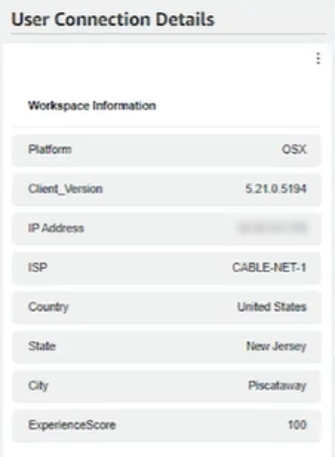
The User Connection Details Widget takes a WorkSpace ID as input and pulls together IP address data, geographic location, platform details, and connection quality scores — all in one structured view. IT teams get the full picture of any user's session without digging through AWS consoles.
- Powered by AWS Lambda — no server management needed
- Queries CloudWatch Logs for real session data
- Surfaces IP, location, platform and experience score
- Clean table display — no AWS console required
How It Works
Input
The widget takes a WorkSpace ID as input — the unique identifier for the WorkSpace you want to investigate. That's all it needs to pull together the full connection picture.
AWS Services Used
- AWS Lambda: Runs the widget logic serverlessly — no infrastructure to manage.
- CloudWatch Logs: Queried to retrieve IP, platform, client version, and location data.
- Boto3 Library: AWS SDK for Python — enables programmatic interaction with all AWS services.
Data Retrieval
Two layers of CloudWatch Logs queries run in sequence:
- IP Address lookup — retrieves platform, client version, and IP for the WorkSpace ID.
- Location lookup — uses the IP to find ISP, country, state, city, and network experience score.
Data Display
All retrieved data is presented in a clean HTML/CSS table with the following columns:
Ready to Take Control?
See the full Workspace Insights Commander suite and get started today.